FLASH SALE: Save $50 off all colors of Ultra Open Earbuds. Buy now
No Image

Setss
Ultra Set
Current Price is: $777.00
Original Price is: $1,027.00
Set includes::

Bose QuietComfort Ultra Headphones
World-class noise cancellation, quieter than ever before. Breakthrough spatialized audio for immersive listening, no matter the content or source. Elevated design and luxe materials for unrivaled comfort. It’s everything music makes you feel taken to new highs. Bose Immersive Audio pushes the boundary of what it means to listen by taking what you’re hearing out of your head and placing it in front of you. Sound just got real.
Save $150 while supplies last
Test
GiftBox_test

Bose Ultra Open Earbuds
Ultra Open Earbuds feature a brilliant combination of innovative open-ear design, incredible audio, and all-day comfort. With a cuff-like fit, Ultra Open Earbuds leave your ears open to hear the world around you while OpenAudio technology delivers rich, private sound.
Test

Bose QuietComfort Ultra Earbuds
Featuring breakthrough spatialized audio, world-class noise cancellation, and CustomTune technology that tailors sound and silence to you, our premium in-ear earbuds feel as good as they sound. Comfortable and secure, they come with nine potential combinations of eartips and stability bands to find your ideal fit. You’ll feel your music more with customizable listening modes, including Immersion Mode, plus enjoy simple touch controls and up to 6 hours¹ of battery life. The ultra in-ear experience has arrived — sound just got real.
Save $100 while supplies last.
Test
My Bose members: Receive a Holiday Bonus Card with every product purchase above $100 from Dec 4-23. Learn more
4 Interest-free installments with Klarna or Afterpay.
Learn more
Ultra Set
Current Price is: $777.00
Original Price is: $1,027.00
Product details
What’s in the Box
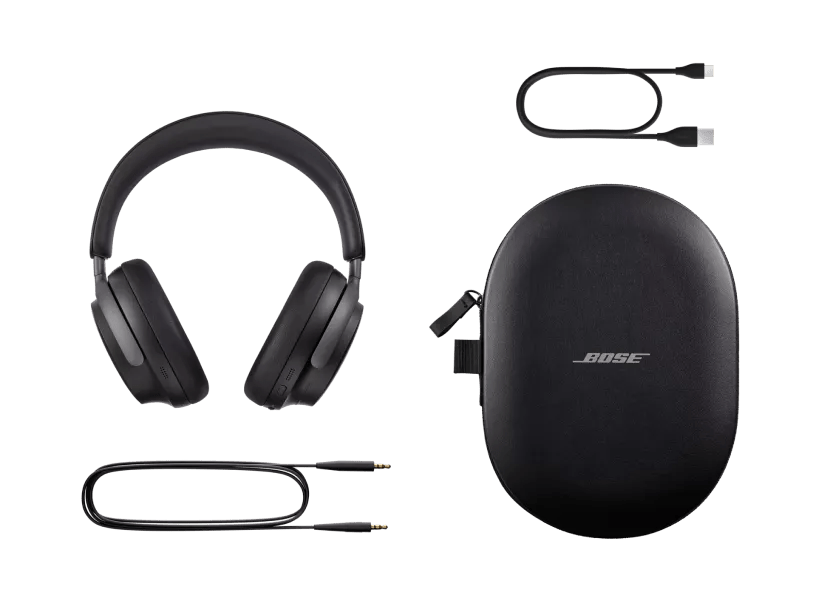
- Bose QuietComfort Ultra Headphones
- Carry case
- 3.5 mm to 2.5 mm audio cable
- USB-C® (A to C) cable (20")
- Safety sheet
specifications.usbRequirementHeading
- specifications.usbRequirementText
- specifications.usbRequirementChargerNotIncluded

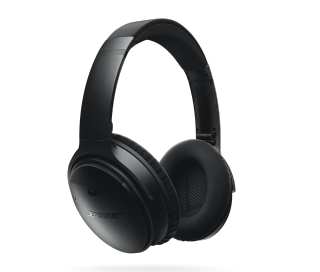
Bose QuietComfort Headphones are the successors to QuietComfort 45 Headphones. They deliver high-fidelity audio performance and world-class noise cancellation that allow you to hear more of your music and movies — while traveling, at the office, or at home.
QuietComfort Ultra Headphones offer our most premium design and our most advanced technologies, for the best Bose listening experience in a headphone. With QuietComfort Ultra Headphones, you will enjoy our best headphone noise cancellation, audio quality personalized with CustomTune, and voice pickup, among other premium features.
Immersive Audio allows you to hear audio as if it were coming from beyond your QuietComfort Ultra Headphones, thereby allowing for a more spacious, natural listening experience. Your music and other audio will have a wide sound stage in front and to the sides, just as if you were listening to a pair of stereo speakers and seated at the sweet spot between them.
Bose CustomTune technology is a proprietary Bose technology that optimizes the audio playback you hear based on the unique physical properties of your ear and ear canal. It works by playing a specially designed calibration tone as the welcome chime each time you power on the headphones while wearing them. It then measures how the shape of your ear uniquely modifies that sound. The headphones use that information to adjust their sound to your ears, creating a more balanced, authentic audio experience.
Proprietary TriPort acoustic headphone structure utilizes external ports to vent the earcups and effectively enlarge the acoustic volume, without increasing the size of the earcup. The result is better audio and active noise reduction from a smaller, lighter, more comfortable headphone.
Bose QuietComfort Ultra Headphones utilize both active and passive noise reduction technologies. They use a sophisticated proprietary electronics approach for active noise reduction, placing microphones both inside and outside the earcups. The electronics system senses the sound in almost any environment and then measures, compares, and reacts — instant by instant — to produce an opposing cancellation signal. Meanwhile, passive noise reduction is achieved by the combination of earcup fit, design, and clamping force of the headband.
QuietComfort Ultra Headphones have three controls on the right earcup: a Bluetooth/power button at the bottom, a multi-function button in the back, and a capacitive volume strip along the edge. Additionally, the headphones are equipped with on-head/off-head detection, which is another way to control the product.
• The Bluetooth/power button is used to power the headphones on/off, put the headphones in pairing mode, cycle through paired devices, and more.
• The multi-function button supports audio playback (e.g., play/pause/skip), telephony (e.g., answer/decline calls), mode switching (e.g., Quiet, Aware, Immersion), and more.
• Swiping along the volume strip changes volume, and pressing and holding on it activates a user-configurable shortcut.
• Putting the headphones on and taking them off controls wake/sleep/auto-off and resume/pause. Auto-off can be customized in the Bose app.
Listening modes are collections of headphones settings that you can name and access with a single action. You can combine the following settings in a mode:
• Noise cancellation level
• Wind Block on/off
• ActiveSense on/off (applicable only in Aware mode)
• Immersive Audio setting
Three modes are provided by default:
• Quiet: noise cancellation set to maximum; all other settings off
• Aware: noise cancellation set to Aware; all other settings off
• Immersion: noise cancellation set to maximum; Immersive Audio set to Motion
With the Bose app, you can create your own custom modes as well as switch between modes.
ActiveSense listens for very loud outside sounds and selectively applies noise cancellation briefly during those sounds. This way, you can remain aware of your surroundings without having your music drowned out by interruptions like passing vehicles and loud appliance motor noises such as a coffee grinder or blender. ActiveSense can be enabled and disabled in the Aware Mode setting.
Wind Block is a setting you can use when your environment is windy. Wind Block mutes the microphones on the outside of the earcups used for noise cancellation so that gusts of wind do not cause system responses that become noise disturbances in themselves. Note that the exterior microphones used for voice pickup are not muted, so if you’re on a call, the person on the other end will still hear the wind.
Bose QuietComfort Ultra Headphones also give you two options when it comes to audio EQ. Do nothing and the bass, midrange, and treble of whatever you’re listening to will be adjusted automatically to make it sound great. Or choose Equalizer in the settings of the Bose app to change the audio levels yourself to however you like them best. Either way, you’ll enjoy immersive sound at any volume.
Yes. QuietComfort Ultra Headphones have an adaptive microphone system that allows you to use the headphones during calls when connected to any smartphone. In addition to traditional calls, the headphones will work with many apps that use Voice over Internet Protocol (VoIP), such as Teams, Zoom or FaceTime. The microphone system adapts to your environment to isolate your voice from competing background noises and wind so that you can confidently take a call, knowing you will be heard clearly and naturally. In addition, self-voice allows you to hear yourself naturally, as if you weren’t wearing headphones at all, so you can monitor the volume of your voice and minimize the effects of speaking while wearing headphones.
First, make sure your headphones are turned on with the slider switch in the middle “On” position. Next, slide and hold the switch to the Bluetooth icon until the Bluetooth LED flashes blue or when the voice prompt indicates the headphones have entered into pairing mode. Please note, if this is your first time connecting the headphones, they will automatically turn on into pairing mode. Voice prompts will provide you with additional guidance. We recommend using the Bose app to complete the pairing process, however, Bluetooth settings on your device can be used to complete pairing.
Bose QuietComfort Ultra headphones have a range of up to 30 ft (9 meters) from the source device. This range may be reduced by physical obstructions, such as walls and doors, or by interference from other electronic devices. Pops or a cracking noise may be heard if there’s interference with the Bluetooth connection. If that happens, move away from wireless routers or microwaves and bring your headphones closer to the Bluetooth device.
The headphones can be charged using the USB-C cable supplied in the box and plugging into a USB port on a PC, laptop, or wall charger. Allow up to 2 hours for the headphones to fully charge. The battery light indicator will show an amber light while the headphones are charging and turn green when fully charged. When you don’t have time for a full charge, the fast-charge feature provides up to 3 hours of play time from a quick, 15-minute charge.
No. QuietComfort Ultra Headphones feature proprietary Bose active EQ to provide incredible, life-like sound, in conjunction with a personalized listening experience enabled by CustomTune technology. To enable this, the headphones must be powered on during use, including when using the auxiliary audio cable.
No.
Yes. The Ultra Headphones have the Bluetooth multipoint feature allowing them to connect to two source devices at the same time. This is a recent update as of July 2024, so be sure to set up your earbuds with the Bose app to receive software updates.
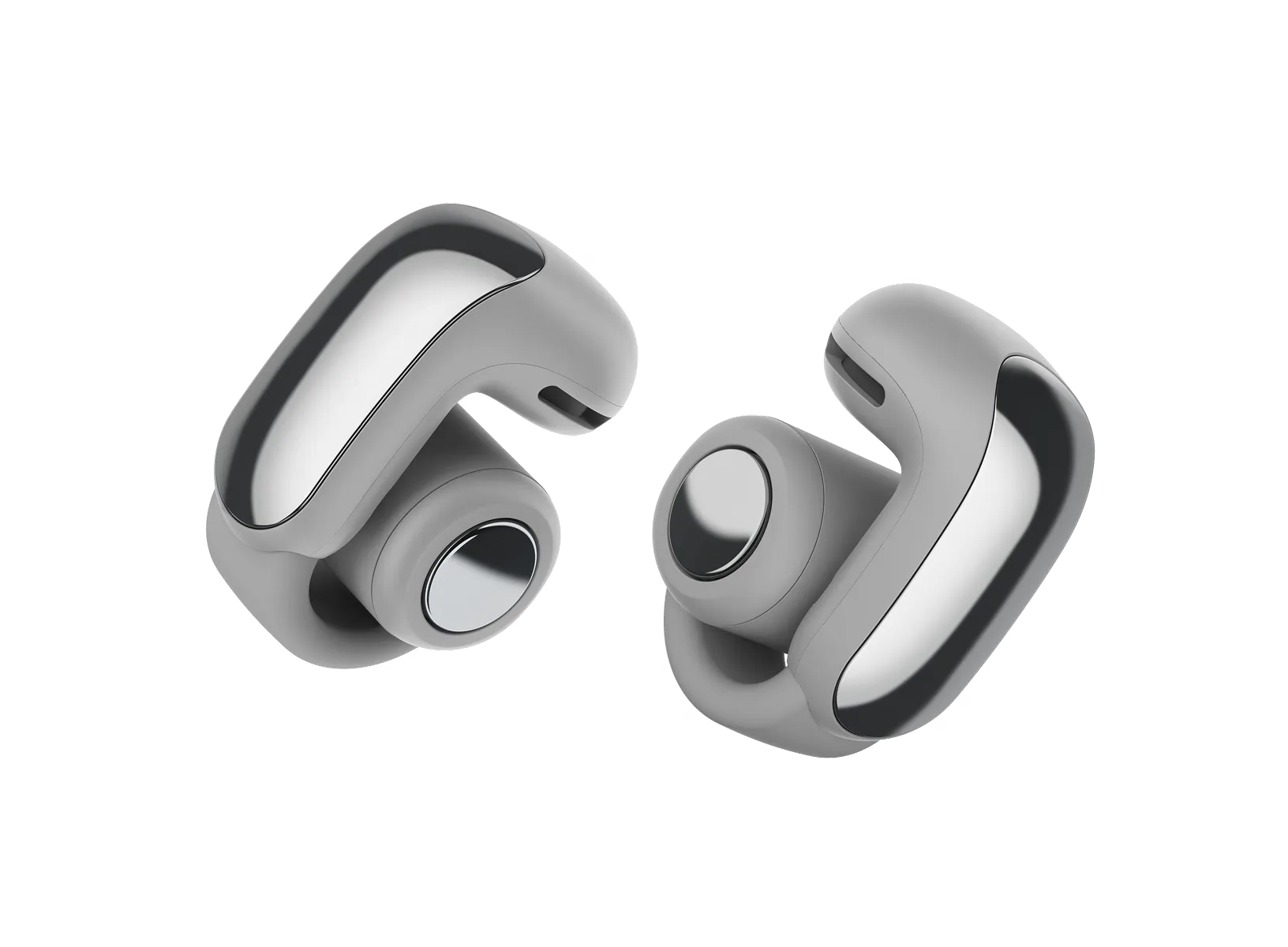
What’s in the Box
- 2 Bose Ultra Open Earbuds
- Charging case
- USB-C® (A to C) cable (12")
- Safety sheet
specifications.usbRequirementHeading
- specifications.usbRequirementText
- specifications.usbRequirementChargerNotIncluded

| Headphone Fit | Open Ear |
|---|---|
| Microphones | Built-in Microphone |
| Noise Cancelling | No |
| Water Resistant | IPX4 |
| Case | Charging, Protection |
| Bud Single | 0.73" H x 0.67" W x 1.07" D (0.014 lb) |
| Case | 1.65" H x 2.56" W x 1.04" D (0.097 lb) |
| Product Material | Plastic (PC-ABS), Metal, Silicone, Gold Plating |
| Product Case Material | Plastic (Hard) |
| Rechargeable | Yes |
| Battery Life | 7 hours |
| Battery Charge Time | 1 hour |
| Charging Accessory included | Yes |
| Charging Interface(s) | USB C PORT |
| Wireless Connectivity | A2DP Bluetooth Audio Streaming, Bluetooth, Bluetooth Low Energy, HFP Bluetooth, Wireless Connectivity, AAC Bluetooth, SBC Bluetooth |
| Bose App | Bose App |
The Bose Ultra Open Earbuds are a totally new kind of audio wearable device: premium sound built into a cuff-shaped earbud that doesn’t cover your ear. Proprietary Bose OpenAudio technology allows the earbuds to play rich, immersive audio privately even though the speakers on the earbuds sit a short distance from your ear canal, leaving you open to the sounds of your surroundings. The cuffs hook around the outside of your ear so gently that you might forget they’re even there, so you can leave them on all day, always ready for music, calls, or videos.
The Open Earbuds were designed from the ground up to give you a soundtrack for your life: to let you enjoy your music without blocking your ears, in a shape so comfortable you can almost forget you’re wearing any earbuds at all. The engineering of these earbuds was a matter of squeezing Bose OpenAudio technology — which projects deep, rich sound across a short distance of open space to your ear canal — into a shape that could grip your ear extremely gently, leave your ear open to outside sounds, and contain a long-lasting battery. This design process resulted in the Open Earbuds’ unique shape, inspired by ear cuff jewelry. The light-as-air flex arm connects the audio portion of the earbud to a battery barrel that goes behind your ear, providing just enough grip to keep the earbuds secure on any size ear.
Yes. The Open Earbuds are excellent for exercise, thanks to their confident stability on your ear, powerful sound, and open design. Bose’s unique OpenAudio technology allows air to keep your ears cool and dry while you enjoy both your music and sounds from your environment, such as city sounds, nature, input from a coach or workout partner, or sounds that help you play a sport such as tennis or basketball.
Yes. The combination of skin-safe materials, a fully open design, long battery life, and unparalleled comfort means you can leave the earbuds on all day, always connected to your device and ready to produce rich audio the moment you need it.
In stereo mode, the earbud batteries will provide up to 7 hours of play time or 48 hours of standby time (no audio playing). For all-day wear that involves a mix of audio listening and standby, the battery life will vary depending on the proportion of each. For example, 5 hours of audio would leave 10 hours of standby life remaining. And if the battery does run out, a quick 10-minute charge in the case will add up to 2 hours of play time.
Yes. You can slide the earbud slightly up or down the outside of your ear to adjust for comfort, preferred sound balance, looks, or to avoid interference with jewelry.
Yes. The Open Earbuds are uniquely designed to attach to a part of the ear that does not interfere with most glasses, hats, and piercings. If your accessories touch the product, that’s no problem as long as the earbuds remain comfortable and secure. The magnets that help the earbuds attach to their charging case may occasionally stick slightly to jewelry made of ferromagnetic metals like nickel; this is not damaging to the earbuds or the jewelry, but if bothersome can be avoided by slightly sliding the earbud up or down the ear, away from the jewelry.
OpenAudio is a proprietary Bose technology that allows audio played a short distance from your ear canal to be rich, deep, and private — without sealing your ear. Each earbud uses a tiny dipole transducer system engineered for loud-and-clear personal audio that stays at the ear — instead of going everywhere else.
It’s easy to hear the difference Bose OpenAudio makes by comparing the power of the Bose Ultra Open Earbuds with a traditional set of earbuds held slightly outside your ear. If you remove the traditional earbud from your ear canal and hold it near your ear at the same distance that the Open Earbuds sit, you’ll notice the much greater volume and richer bass from the Open Earbuds.
Bose OpenAudio directs rich, deep audio into the ear canal while using proprietary technology to minimize sound spillage in other directions. In most environments and at most listening levels, people around you won’t hear a thing. If you turn up the volume all the way in a very quiet environment, others may hear that something is playing from your earbuds, but they won’t be able to hear any detail unless they get very close.
No. By design, the Open Earbuds don’t block out the world or have noise cancelling, so you can enjoy your music while staying open to the sounds of the world around you. They do have an automatic volume control feature, available in the Bose app, that helps you hear your music evenly as your environment changes from quiet to loud and back.
Yes. The Ultra Open Earbuds have the Bluetooth multipoint feature allowing them to connect to two source devices at the same time. This is a recent update as of July 2024, so be sure to set up your earbuds with the Bose app to receive software updates.
The Bose app also allows you to customize the shortcut function on each earbud’s button, and one of the available options is Switch Source. Setting a shortcut to Switch Source will enable you to switch between previously connected Bluetooth source devices with a press and hold of the earbud button without needing to take the earbuds off.
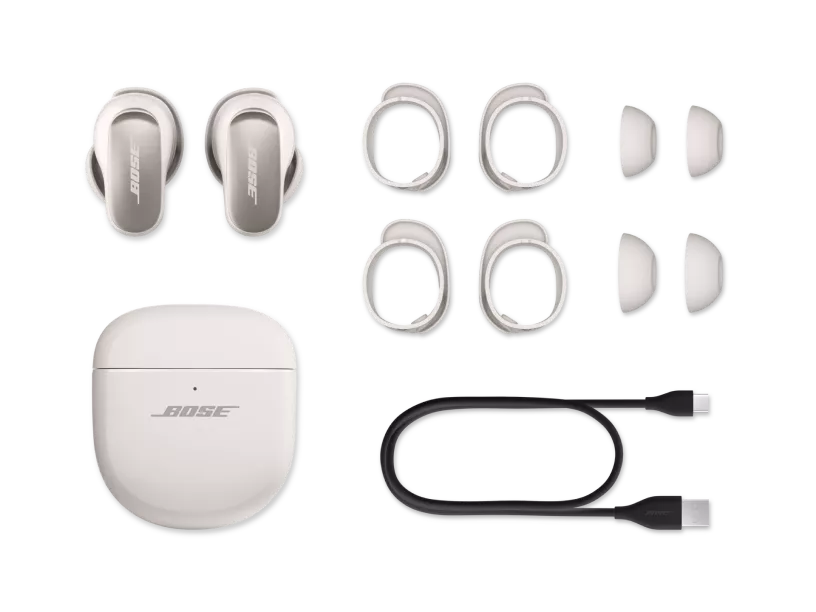
What’s in the Box
- 2 Bose QuietComfort Ultra Earbuds
- Bose Fit Kit:
- 3 pairs of eartips (S, M, L)
- 3 pairs of stability bands (1, 2, 3)
- Charging case
- 12” USB-C® (A to C) cable
- Safety sheet
specifications.usbRequirementHeading
- specifications.usbRequirementText
- specifications.usbRequirementChargerNotIncluded

QuietComfort Ultra Earbuds offer all the same features as their predecessor, QuietComfort Earbuds II, plus breakthrough Bose Immersive Audio and the addition of Immersive Audio settings for Custom Modes. Other new features include Snapdragon Sound certification, using hi-res audio and low latency codec, Qualcomm aptX Adaptive, and Google Fast Pair. QuietComfort Ultra Earbuds also feature a new metallic finish on earbuds, as well as a new notch/key alignment feature for stability bands that makes them easier to swap in and out.
Immersive Audio allows you to hear audio as if it were coming from beyond your QuietComfort Ultra Earbuds, thereby allowing for a more spacious, natural listening experience. Your music and other audio will have a wide sound stage in front and to the sides, just as if you were listening to a pair of stereo speakers and seated at the sweet spot between them.
Bose QuietComfort Ultra Earbuds utilize both passive and active noise reduction technologies. Passive noise reduction is similar to when you wear earplugs; there is a physical blockage preventing some of the sound from entering your ear. This is achieved through the earbud design with materials such as silicone eartips, and the acoustic seal created by having a proper fit. For active noise cancellation, your earbuds use sophisticated proprietary electronics with microphones both inside and outside the earbuds. The electronics system senses the sound in almost any environment and then measures, compares, and reacts — instant by instant — to produce an opposing cancellation signal.
The controls on the left and right earbud surfaces are the same, and they include:
• Swipe up or down for volume control
• Tap once to play or pause content
• Tap twice in quick succession to skip forward
• Tap three times in quick succession to skip back
• Press and hold the earbud surface to access a Shortcut. The default Shortcut function on both buds is to toggle back and forth between Quiet Mode (full noise cancelling) and Aware Mode (hear outside sound). You can add additional noise cancelling modes at sound levels between Quiet and Aware using the Bose app. The Shortcut on one or both earbuds can also be customized in the Bose app to access a mobile device’s built-in voice assistant
• Tap once to accept an incoming call
• Tap twice in quick succession to end a call, or decline an incoming call
Yes. The Single-bud Use feature allows you to take calls and listen to music using one bud. It will also seamlessly switch between your earbuds, and switches automatically if one of the earbuds runs out of battery or disconnects from Bluetooth®.
Yes. The Bose QuietComfort Ultra Earbuds have passed IPX4 testing, which means they are protected against sweat and splashing water from any angle. The interior of the charging case is resistant to water or sweat that may remain on the buds when they are placed inside for charging; however, it is not recommended that the outside of the case be exposed to water.
You should take some time to experiment with different eartip and stability band sizes to arrive at a combination that suits you, providing a gentle seal and a comfortable, stable experience. Keep in mind that it’s common for left and right ears to vary slightly in shape, so sizes may not match from left to right. Also, eartip and stability band sizes may be mixed and matched (such as using a size small eartip with a #3 stability band). If you find that you need alternate sizes, extra small and extra-large eartips and stability bands are available through Bose Support.
There are two lights: an Earbud status light inside the case between the earbuds, and a Charging Case status light on the outside of the case. Earbud status light (inner):
• Slowly blinks blue – Ready to connect
• Solid blue (5 seconds) – Connected
• Blinks white 2 times – Device list cleared
• Solid white (5 seconds) – Earbuds are fully charged
• Solid amber (5 seconds) – Earbuds are charging
• Blinks white 2 times – Reboot complete
• Blinks white 3 times, repeated – Updating earbud software
• Blinks amber and white – Error, contact Bose customer service
Charging Case status light (outer):
• Solid white – Case is fully charged (100%) and plugged in
• Solid white (5 seconds) – Case is charged (34% to 99%)
• Solid amber (5 seconds) – Case has low charge, less than one full earbud charge remaining (10% to 33%)
• Blinks amber 2 times – Case needs to charge (Less than 10%)
• Solid amber – Case is charging
• Blinks white 3 times, repeated – Updating case software
• Blinks amber and white – Error, contact Bose customer service
Yes. Bose QuietComfort Ultra Earbuds have an adaptive microphone system that allows you to use them during calls when connected to any smartphone. In addition to traditional calls, the earbuds work with many apps that use Voice over Internet Protocol (VoIP), such as Teams, Zoom, or FaceTime. The microphone system adapts to your environment to isolate your voice from competing background noises and wind. In addition, self-voice (adjustable in the Bose app settings) allows you to hear yourself naturally, as if you weren’t wearing earbuds at all, so you can monitor the volume of your voice and minimize the effects of speaking while wearing earbuds.
Yes. The Ultra Earbuds have the Bluetooth multipoint feature allowing them to connect to two source devices at the same time. This is a recent update as of July 2024, so be sure to set up your earbuds with the Bose app to receive software updates.
Snapdragon Sound refers to an audio and software processing infrastructure developed by Qualcomm, focusing on robust and low latency Bluetooth connectivity and leveraging the aptX Adaptive codec. AptX Adaptive will “adapt” the audio quality seamlessly and continuously based on the strength back to the source’s device to maintain a good wireless connection and avoid audio dropouts. This means that for a great wireless connection, you can get the highest possible audio quality up to and including “lossless” audio. The normal sampling rate applicable in your Bose QuietComfort Ultra Earbuds is 44.1 kHz and will adapt up to 48.1 kHz when “high resolution” listening. The codec also has a low latency mode, aka “Gaming Mode.” Just as with audio quality, the codec will “adapt” to achieve the best (lowest) latency possible given the current wireless conditions.
Snapdragon Sound is applicable only to Android users with Snapdragon Sound Certified devices.
Google Fast Pair is a technology developed by Google to expedite the initial pairing process between source devices and headphones. Android users (OS 6.0 or newer) will enjoy the rapid setup Google Fast Pair has to offer by simply turning on their headphones and selecting the Google pair pop-up window on their Android device (Android device location services and Bluetooth must be set to “on”).